
On This Page
- What Is Email Marketing Automation?
- The 7 Essential E-commerce Automations
- Workflow 1: Welcome Series
- Workflow 2: Abandoned Cart Recovery
- Workflow 3: Post-Purchase (First-Time Buyer)
- Workflow 4: Browse Abandonment
- Workflow 5: Win-Back Campaign
- Workflow 6: Review Request
- Workflow 7: Replenishment Reminder
- Workflow 8: VIP / Loyalty Milestone
- Workflow 9: Back-in-Stock
- Workflow 10: Price Drop Alert
- Workflow 11: Birthday / Anniversary
- Workflow 12: Referral Program
- Workflow 13: Cart/Product Back (Re-engagement)
- Workflow 14: Subscription Management
- Workflow 15: Survey / Feedback Collection
- Automation Best Practices
- Conclusion
- Where Tajo fits
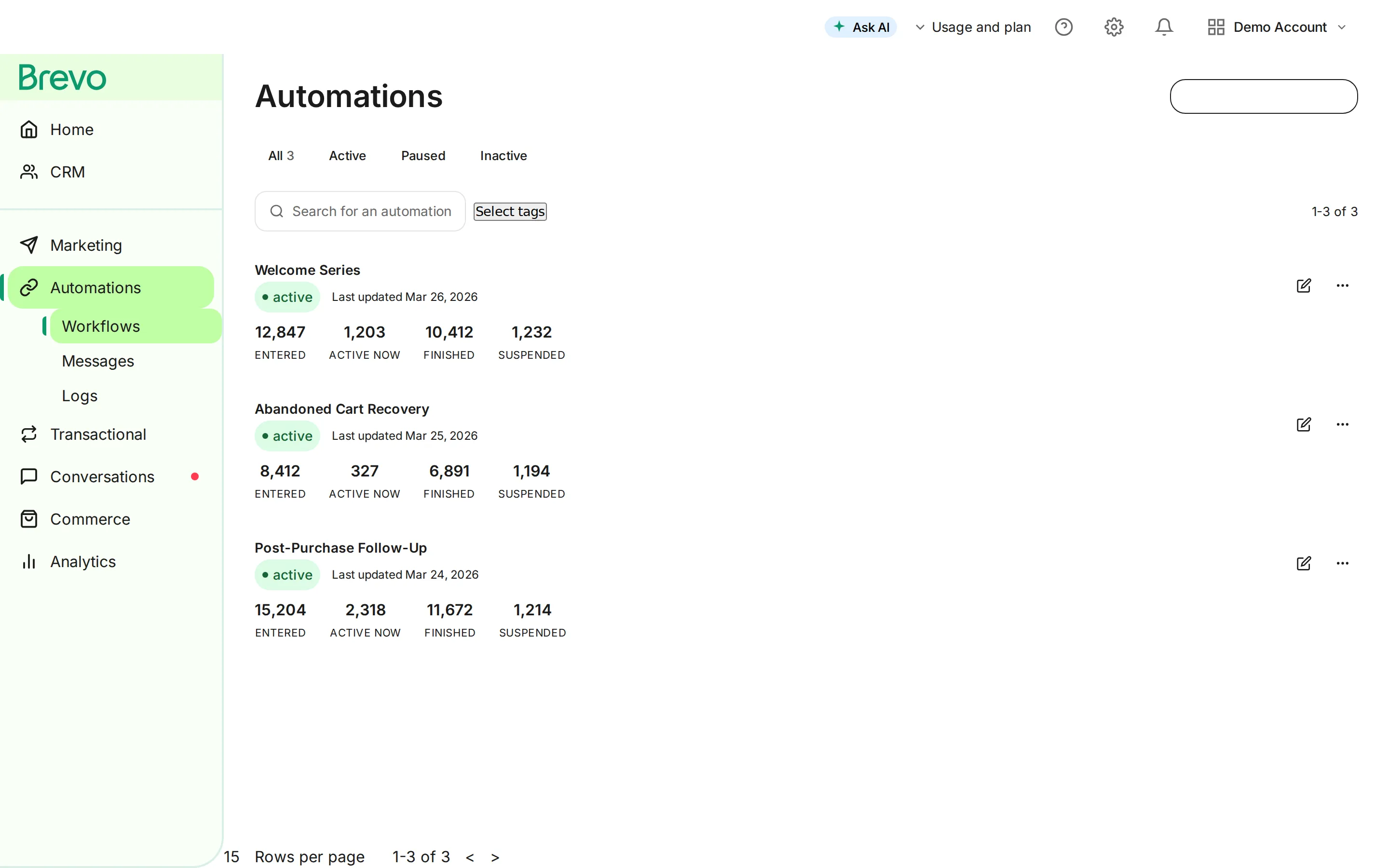
Email automation is the difference between email marketing that works while you sleep and email marketing that requires constant attention. For e-commerce, automated workflows generate 30-50% of email revenue while requiring minimal ongoing effort.
This guide provides 15 ready-to-implement automation workflows with exact triggers, timing, and content strategies.
What Is Email Marketing Automation?
Email automation sends the right message at the right time based on customer behavior, without manual effort.
Manual Campaigns vs. Automations
| Aspect | Manual Campaigns | Automated Workflows |
|---|---|---|
| Trigger | You decide to send | Customer action triggers |
| Timing | When you schedule | Based on behavior timing |
| Personalization | Segment-level | Individual-level |
| Effort | Every campaign | Set up once |
| Revenue | Variable | Consistent, predictable |
Why Automation Matters for E-commerce
Statistics that matter:
- Automated emails generate 320% more revenue than non-automated
- Welcome emails have 4x higher open rates than promotional
- Abandoned cart emails recover 5-15% of lost sales
- Automated emails drive 21% of email marketing revenue (from just a few workflows)
The 7 Essential E-commerce Automations
Before exploring all 15 workflows, here are the 7 you must have:
| Priority | Workflow | Revenue Impact |
|---|---|---|
| 1 | Welcome Series | Converts 50% more subscribers |
| 2 | Abandoned Cart | Recovers 5-15% of abandoned carts |
| 3 | Post-Purchase | Increases repeat purchases 20-30% |
| 4 | Browse Abandonment | Recovers interested non-buyers |
| 5 | Win-Back | Reactivates 5-10% of lapsed customers |
| 6 | Review Request | Generates 2-3x more reviews |
| 7 | Replenishment | Drives 15-25% repeat purchase rate |
Workflow 1: Welcome Series
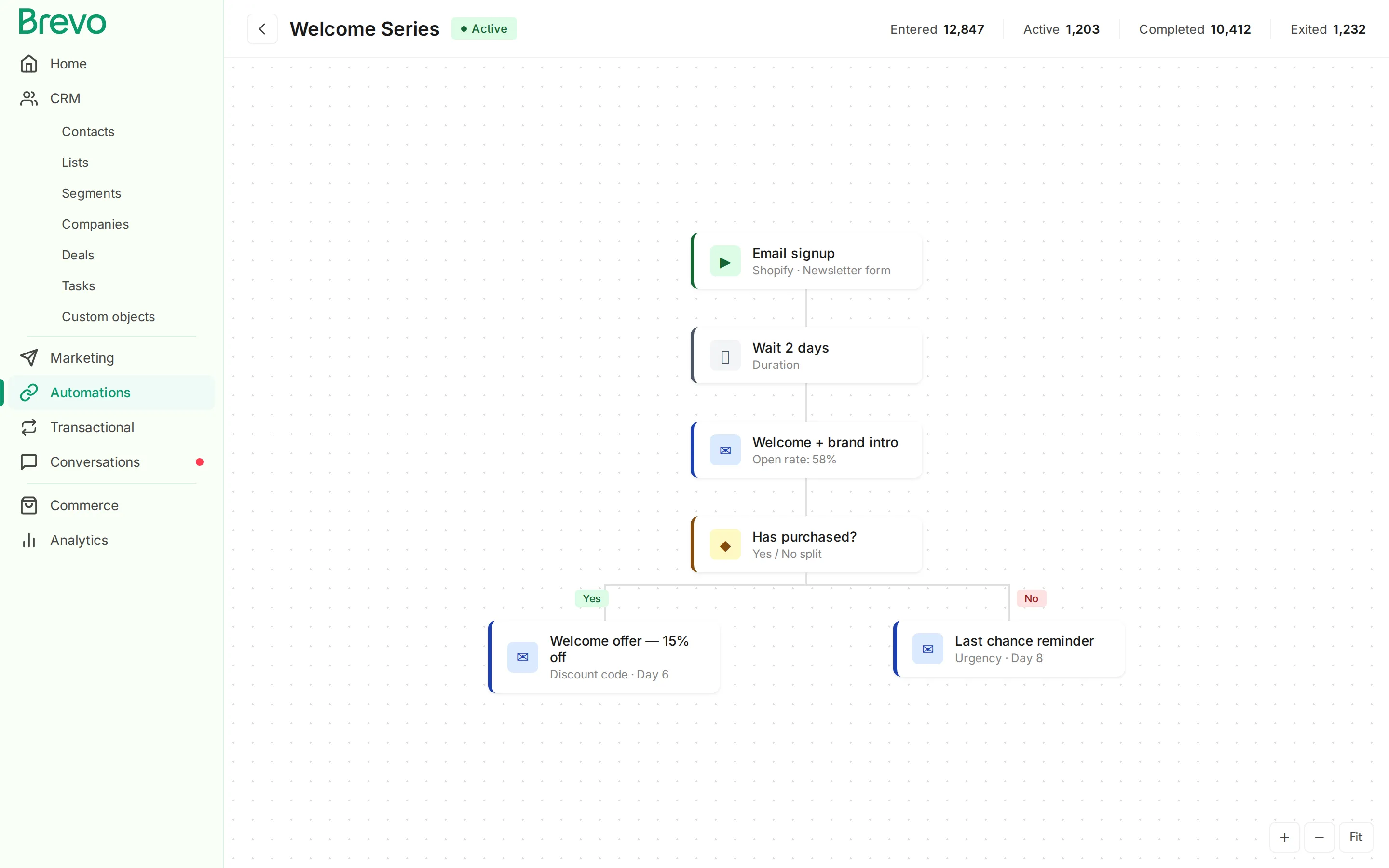
Trigger: Email signup (no purchase yet)
Goal: Convert subscribers to first-time buyers
Flow Structure
-
Signup
- Immediate
Email 1: Welcome
-
Wait 2 days
Day 2Email 2: Brand Story
-
Wait 2 days
Day 4Email 3: Social Proof
-
Wait 2 days
Day 6Email 4: Welcome Offer
-
Wait 2 days
Day 8Email 5: Last Chance
-
Exit (purchased or completed sequence)
Email Details
Email 1: Welcome
- Subject: “Welcome to [Brand] 🎉”
- Content: Thank you, what to expect, brand intro
- CTA: Browse best sellers
Email 2: Brand Story
- Subject: “The story behind [Brand]”
- Content: Origin story, mission, values
- CTA: Learn more / Shop
Email 3: Social Proof
- Subject: “Why customers love [Brand]”
- Content: Reviews, testimonials, UGC
- CTA: See what others are buying
Email 4: Welcome Offer
- Subject: “Your exclusive 15% welcome discount”
- Content: Discount code, expiration, popular products
- CTA: Claim your discount
Email 5: Last Chance
- Subject: “Your discount expires tomorrow ⏰”
- Content: Urgency, discount reminder, product picks
- CTA: Use before it’s gone
Exit Conditions
- Subscriber makes a purchase → Move to post-purchase flow
- Completes sequence → Move to regular newsletter
Key Metrics
- Welcome series conversion rate: Target 5-10%
- Open rates: Target 50%+ for Email 1, declining naturally
- Discount redemption: Target 10-15%
Workflow 2: Abandoned Cart Recovery
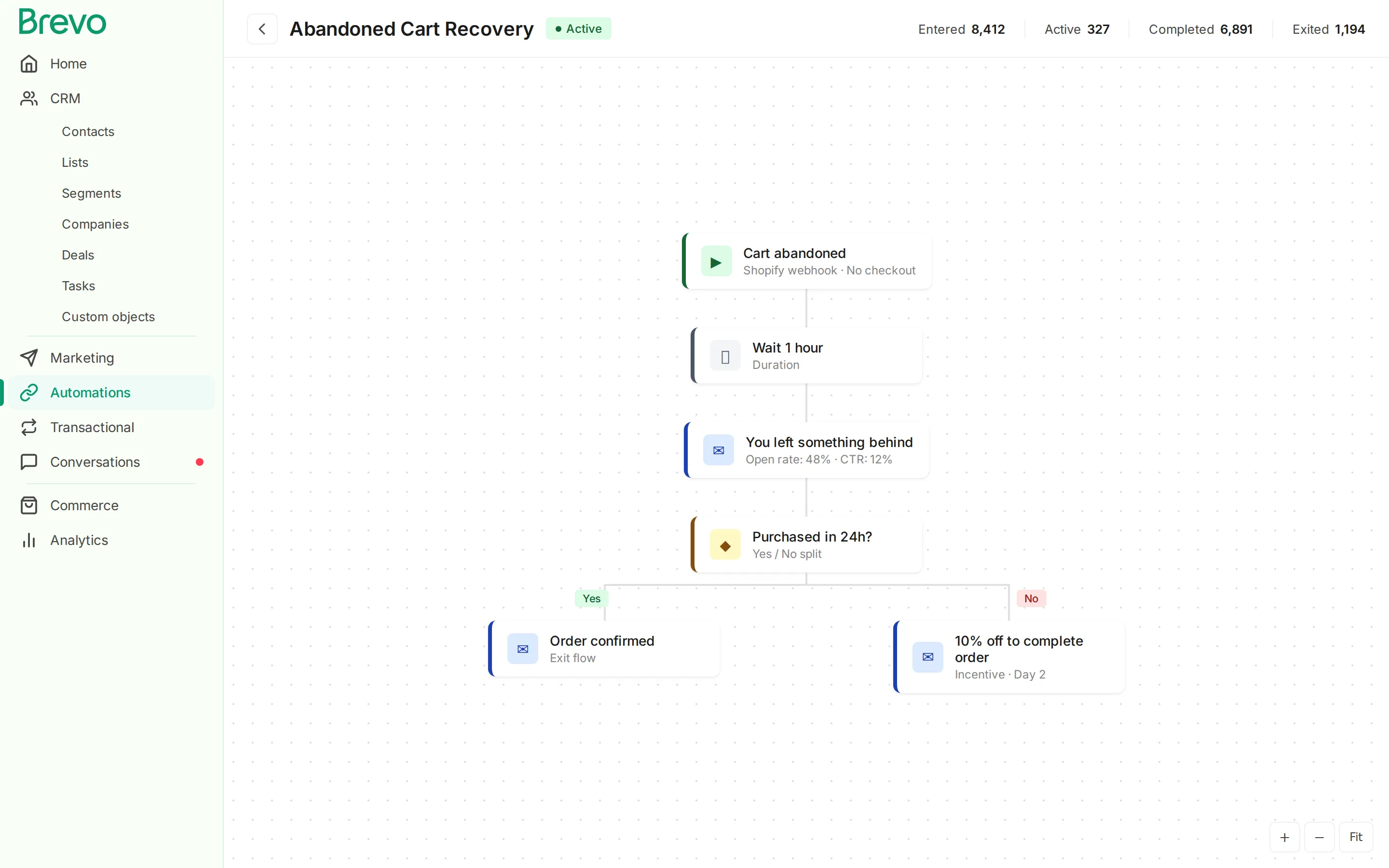
Trigger: Cart abandoned (items added, checkout not completed)
Goal: Recover abandoned carts and generate immediate revenue
Flow Structure
-
Cart Abandoned
-
Wait 1 hour
1 hourEmail 1: Reminder
-
Wait 23 hours (Day 1)
Day 1Email 2: Social Proof
-
Wait 24 hours (Day 2)
Day 2Email 3: Incentive
-
Wait 24 hours (Day 3)
Day 3Email 4: Final Urgency
-
Exit
Email Details
Email 1: Simple Reminder
- Subject: “You left something behind”
- Content: Cart contents with images, simple reminder
- CTA: Complete your order
- No discount yet
Email 2: Social Proof
- Subject: “Here’s what others say about [Product]”
- Content: Product reviews, star ratings, “great choice” messaging
- CTA: Return to cart
Email 3: Incentive (Optional)
- Subject: “10% off to complete your order”
- Content: Discount code, cart contents, limited time
- CTA: Claim discount + complete order
Email 4: Final Urgency
- Subject: “Your cart expires soon”
- Content: Scarcity (low stock if true), final reminder
- CTA: Complete before it’s gone
Split Test: With vs. Without Discount
Some brands see better results without discounts:
- Test flow with discount (Email 3) vs. without
- If no-discount performs similarly, save margin
- Reserve discounts for high-value carts
Exit Conditions
- Purchase completed → Move to post-purchase
- Cart cleared → Exit
Key Metrics
- Recovery rate: Target 5-15%
- Revenue per email: Track closely
- Discount usage: Monitor if offering
Workflow 3: Post-Purchase (First-Time Buyer)
Trigger: First order placed
Goal: Build loyalty, drive repeat purchase, gather reviews
Flow Structure
-
First Purchase
- Immediate
Email 1: Order Confirmation
- When shipped
Email 2: Shipping Notification
- After delivered + 3 days
Email 3: How-To / Care Guide
-
Wait 4 days
Email 4: Review Request
-
Wait 7 days
Email 5: Cross-Sell
-
Wait 7 days
Email 6: Loyalty Invitation
-
Exit
Email Details
Email 1: Order Confirmation
- Subject: “Order confirmed! Here’s what’s next”
- Content: Order details, timeline, “complete the look” recommendations
- Opportunity: Include referral program mention
Email 2: Shipping Notification
- Subject: “Your order is on its way! 📦”
- Content: Tracking info, estimated delivery, what to expect
Email 3: How-To Guide
- Subject: “Get the most from your [Product]”
- Content: Usage tips, care instructions, video if applicable
- Timing: After delivery, give time to open
Email 4: Review Request
- Subject: “How did we do? (1-minute feedback)”
- Content: Star rating, optional text review, incentive (points/discount)
- Timing: After they’ve had time to use the product
Email 5: Cross-Sell
- Subject: “Customers who bought X also love…”
- Content: Complementary product recommendations
- Personalization: Based on purchased category
Email 6: Loyalty Program Invite
- Subject: “You’ve earned [X] points - see your rewards”
- Content: Points balance, how program works, benefits of next tier
- CTA: Join loyalty program / View rewards
Exit Conditions
- Completed sequence → Move to repeat customer segment
- Makes second purchase → Trigger repeat buyer flow
Workflow 4: Browse Abandonment
Trigger: Product viewed but not added to cart (within session)
Goal: Re-engage interested visitors who didn’t take action
Flow Structure
-
Product Viewed (No Cart Add)
-
Wait 2 hours
2 hoursEmail 1: Browse Reminder
-
Wait 24 hours
Day 1Email 2: Similar Products
-
Wait 48 hours
Day 3Email 3: Category Highlight
-
Exit
Email Details
Email 1: Browse Reminder
- Subject: “Still thinking about [Product]?”
- Content: Product they viewed, key features, reviews
- CTA: Take another look
Email 2: Similar Products
- Subject: “More [Category] picks for you”
- Content: Product viewed + 3-4 similar options
- CTA: Shop [Category]
Email 3: Category Highlight
- Subject: “Best sellers in [Category]”
- Content: Popular items in their browsed category
- CTA: Shop now
Important Considerations
- Don’t be creepy: Keep timing reasonable
- Frequency cap: Don’t trigger multiple browse emails in one day
- Exit if purchased: Stop immediately if they buy
Key Metrics
- Browse to cart rate: Target 3-5%
- Browse to purchase rate: Target 1-2%
Workflow 5: Win-Back Campaign
Trigger: No purchase in X days (depends on your purchase cycle)
Goal: Reactivate lapsed customers before they churn
Flow Structure
-
No Purchase in 60 Days
- Day 60
Email 1: We Miss You
-
Wait 15 days
Day 75Email 2: What's New
-
Wait 15 days
Day 90Email 3: Win-Back Offer
-
Wait 15 days
Day 105Email 4: Last Chance
-
Exit (or suppress)
Email Details
Email 1: We Miss You
- Subject: “It’s been a while, [Name]”
- Content: “We noticed you haven’t visited,” what’s new, popular products
- CTA: Come see what’s new
- No discount yet
Email 2: What’s New
- Subject: “Things have changed since your last visit”
- Content: New arrivals, improvements, customer favorites
- CTA: Browse new arrivals
Email 3: Win-Back Offer
- Subject: “Come back for 20% off”
- Content: Exclusive discount, popular items, limited time
- CTA: Claim your offer
Email 4: Last Chance
- Subject: “Final offer before we say goodbye”
- Content: Last discount reminder, “we’re cleaning our list”
- CTA: Use discount / Click to stay subscribed
After Win-Back
- Re-engaged: Move back to active customer flows
- No engagement: Suppress or remove from list (improves deliverability)
Timing Considerations
Adjust trigger timing based on your business:
- Consumables (monthly): Start at 45 days
- Fashion (seasonal): Start at 90 days
- High-value items: Start at 120+ days
Workflow 6: Review Request
Trigger: Order delivered + X days
Goal: Generate reviews and user-generated content
Flow Structure
-
Order Delivered
-
Wait 7 days
Day 7Email 1: Review Request
-
If no review after 7 days
Day 14Email 2: Reminder
-
Exit
Email Details
Email 1: Review Request
- Subject: “How are you liking your [Product]?”
- Content: 1-click star rating, optional detailed review, incentive
- Design: Make reviewing as easy as possible (in-email if supported)
- Incentive: Loyalty points, discount, contest entry
Email 2: Gentle Reminder
- Subject: “Quick reminder: Share your thoughts on [Product]”
- Content: Why reviews matter, simplified request
- CTA: Leave a review
Best Practices
- Timing matters: Wait until they’ve used the product (7-14 days after delivery)
- Make it easy: 1-click ratings, no login required if possible
- Incentivize: Loyalty points, small discount, or contest entry
- Product-specific: Request review for specific product, not “your order”
Key Metrics
- Review submission rate: Target 5-10%
- Average rating: Monitor quality
- Photo/video review rate: Track UGC
Workflow 7: Replenishment Reminder
Trigger: X days after purchase (based on product consumption cycle)
Goal: Drive repeat purchases at the right time
Flow Structure
-
Purchase (Consumable Product)
-
Wait (consumption cycle - 7 days)
Email 1: Running Low Reminder
-
Wait 7 days
If not purchased
Email 2: Reorder Prompt
-
Wait 7 days
If not purchased
Email 3: Subscribe & Save Offer
-
Exit
Email Details
Email 1: Running Low Reminder
- Subject: “Time to restock your [Product]?”
- Content: Based on last order, product image, easy reorder
- CTA: Reorder now
Email 2: Reorder Prompt
- Subject: “Don’t run out of [Product]”
- Content: Stronger reminder, maybe add small discount
- CTA: Reorder before you’re out
Email 3: Subscribe & Save
- Subject: “Never run out again: Subscribe & save 10%”
- Content: Subscription option, savings, convenience
- CTA: Start subscription
Product Categories This Works For
- Skincare and beauty
- Supplements and vitamins
- Pet food and supplies
- Coffee and beverages
- Cleaning supplies
- Personal care items
Consumption Cycle Examples
| Product | Typical Cycle | Reminder Timing |
|---|---|---|
| 30-day supplement | 30 days | Day 23-25 |
| Coffee (1lb bag) | 14-21 days | Day 10-14 |
| Skincare (60ml) | 45-60 days | Day 38-45 |
| Pet food (15lb) | 30-45 days | Day 25-35 |
Workflow 8: VIP / Loyalty Milestone
Trigger: Customer reaches spending threshold or loyalty tier
Goal: Recognize and reward best customers
Flow Structure
-
Loyalty Tier Reached (e.g., VIP)
- Immediate
Email 1: Congratulations
-
Wait 3 days
Day 3Email 2: Exclusive Benefits
-
Wait 7 days
Day 10Email 3: VIP-Only Offer
-
Exit (Move to VIP segment)
Email Details
Email 1: Congratulations
- Subject: ”🎉 You made it! Welcome to [VIP Tier]”
- Content: Celebration, new status, overview of benefits
- Tone: Make them feel special
Email 2: Exclusive Benefits
- Subject: “Your [VIP] perks are waiting”
- Content: Detailed benefits breakdown, how to use them
- Include: Early access, exclusive discounts, priority support
Email 3: VIP-Only Offer
- Subject: “VIP exclusive: 25% off (just for you)”
- Content: VIP-only discount or product, reinforce exclusivity
- CTA: Shop your exclusive offer
Tier Milestones to Celebrate
- First purchase (welcome to loyalty)
- Loyalty tier upgrades (Silver → Gold → VIP)
- Spending milestones ($500, $1000, etc.)
- Anniversary (1 year as customer)
- Birthday
Workflow 9: Back-in-Stock
Trigger: Product back in stock that customer viewed/wanted
Goal: Capture pent-up demand
Flow Structure
-
Product Back in Stock
-
Filter: Customers who viewed/waitlisted
ImmediateEmail 1: Back in Stock
-
Wait 24 hours
If not purchased
Email 2: Limited Stock Reminder
-
Exit
Email Details
Email 1: Back in Stock
- Subject: “It’s back! [Product] is in stock”
- Content: Product image, quick description, stock status
- Urgency: “Back in stock (selling fast)”
- CTA: Get it before it’s gone
Email 2: Limited Stock Reminder
- Subject: “Last chance: [Product] won’t last”
- Content: Low stock warning, final reminder
- CTA: Don’t miss out
Implementation Requirements
- Product view tracking (for “interested” customers)
- Back-in-stock waitlist option on product pages
- Inventory sync with email platform
Key Metrics
- Back-in-stock conversion: Target 15-25%
- Speed to purchase: Most buy within hours
Workflow 10: Price Drop Alert
Trigger: Price reduced on product customer viewed/carted
Goal: Convert price-sensitive shoppers
Flow Structure
-
Product Price Reduced
-
Filter: Customers who viewed/carted
ImmediateEmail 1: Price Drop Alert
-
Exit
Email Details
Email 1: Price Drop Alert
- Subject: “Price drop! [Product] is now $X”
- Content: Original price (struck through), new price, savings amount
- Urgency: “Sale price for limited time”
- CTA: Get it at the new price
Best Practices
- Only alert on significant drops (10%+)
- Include time limit if applicable
- Don’t over-use (trains customers to wait)
Workflow 11: Birthday / Anniversary
Trigger: Customer birthday or signup anniversary
Goal: Build emotional connection, drive celebratory purchase
Flow Structure
-
Birthday/Anniversary - 3 Days Before
- 3 days before
Email 1: Birthday Coming
- On day
Email 2: Happy Birthday!
-
Exit
Email Details
Email 1: Birthday Coming
- Subject: “Your birthday gift is waiting 🎁”
- Content: Preview of birthday offer, excitement building
- CTA: Preview your gift
Email 2: Happy Birthday
- Subject: “Happy Birthday, [Name]! 🎂”
- Content: Birthday message, special offer (discount, free gift, points)
- Make it generous: This should feel special
- CTA: Claim your birthday gift
Data Requirements
- Birthday collection (during signup or account)
- Or signup anniversary (everyone has one)
Workflow 12: Referral Program
Trigger: Customer completes purchase (or leaves positive review)
Goal: Drive word-of-mouth through incentivized referrals
Flow Structure
-
Purchase Completed
-
Wait 14 days (after delivery, time to form opinion)
Email 1: Referral Invitation
-
Wait 30 days
If no referrals
Email 2: Referral Reminder
-
Exit
Email Details
Email 1: Referral Invitation
- Subject: “Give $15, Get $15: Share [Brand]”
- Content: How it works, unique referral link, benefits for both parties
- CTA: Share with friends
Email 2: Referral Reminder
- Subject: “Your referral link is ready (don’t forget!)”
- Content: Reminder of benefits, how many have used referrals
- CTA: Share now
Referral Program Structure
| Element | Recommendation |
|---|---|
| Referrer reward | $15-20 credit or 15-20% discount |
| Referred reward | Same or slightly less |
| Minimum purchase | Require minimum to prevent abuse |
| Tracking | Unique referral codes/links |
Workflow 13: Cart/Product Back (Re-engagement)
Trigger: Cart created but site closed, then customer returns
Goal: Continue where they left off
Flow Structure
-
Customer Returns to Site (Cart Exists)
- Immediate
Email 1: Cart Saved Confirmation
-
Exit (or continue to cart abandonment if they leave again)
Email Details
Email 1: Cart Saved
- Subject: “Welcome back! Your cart is waiting”
- Content: “We saved your cart,” cart contents, continue shopping
- Timing: Send within minutes of return visit
- CTA: Continue shopping
When This Helps
- Customer browsed on mobile, wants to buy on desktop
- Interrupted shopping session
- Comparison shopping (returned after checking competitors)
Workflow 14: Subscription Management
Trigger: Subscription event (renewal, payment failed, cancelled)
Goal: Retain subscribers, reduce churn
Flow Structure
Payment Successful:
-
Subscription Renewed
- Immediate
Email: Renewal Confirmation
-
Exit
Payment Failed:
-
Payment Failed
- Immediate
Email 1: Payment Issue
-
Wait 3 days
Day 3Email 2: Update Needed
-
Wait 4 days
Day 7Email 3: Final Warning
-
Subscription Cancelled
Cancellation:
-
Subscription Cancelled
- Immediate
Email 1: We're Sorry to See You Go
-
Wait 7 days
Email 2: Win-Back Offer
-
Exit
Email Details
Payment Issue:
- Subject: “Action needed: Update your payment method”
- Content: What happened, how to fix, link to update
- Tone: Helpful, not alarming
Cancellation Response:
- Subject: “We’re sad to see you go”
- Content: Confirmation, feedback request, win-back offer
- Include: Easy way to resubscribe
Workflow 15: Survey / Feedback Collection
Trigger: Post-purchase or at regular intervals
Goal: Gather insights to improve products and experience
Flow Structure
-
30 Days Since Last Survey (or Post-Purchase)
-
Email 1: Survey Request
-
Wait 7 days
If not completed
Email 2: Survey Reminder
-
Exit
Email Details
Email 1: Survey Request
- Subject: “Quick question (1 minute)”
- Content: NPS question, optional follow-up
- Incentive: Discount or points for completion
- CTA: Take survey
Email 2: Reminder
- Subject: “We’d still love your feedback”
- Content: Quick reminder, emphasize it’s fast
- CTA: Share your thoughts
Survey Best Practices
- Keep it short (1-3 questions)
- Start with NPS (0-10 scale)
- Make mobile-friendly
- Offer incentive for completion
- Actually use the feedback
Automation Best Practices
1. Set Clear Exit Conditions
Every workflow needs defined exits:
- Goal achieved (purchase, review, etc.)
- Sequence completed
- Customer unsubscribed
- Moved to different workflow
2. Prevent Overlapping Workflows
Don’t overwhelm customers:
- Limit to one active flow at a time (or 2 if different purposes)
- Priority rules: Cart > Win-back > Browse
- Global frequency caps across all automations
3. Test Before Full Launch
For each workflow:
- Test trigger with real (test) account
- Verify timing and delays
- Check personalization populates correctly
- Send test emails to multiple clients
4. Monitor and Optimize
Track each workflow’s performance:
- Revenue per recipient
- Conversion rate
- Unsubscribe rate
- Engagement (opens, clicks)
5. Refresh Content Regularly
Even automated emails get stale:
- Update quarterly at minimum
- Refresh subject lines
- Update product recommendations
- Test new approaches
Conclusion
Email automation transforms email marketing from manual campaigns to systematic revenue generation. These 15 workflows cover the complete customer lifecycle:
Acquisition: Welcome series, browse abandonment Conversion: Abandoned cart, price drop, back-in-stock Retention: Post-purchase, replenishment, VIP, birthday Win-Back: Re-engagement, subscription save Advocacy: Review request, referral program
Start with the essential 7, then expand as you master each:
- Welcome Series
- Abandoned Cart
- Post-Purchase
- Browse Abandonment
- Win-Back
- Review Request
- Replenishment
Ready to automate your email marketing?
Where Tajo fits
Tajo is an integration builder. Build integrations. Put agents on them. Let them run engagement. Tajo is in early access. Request early access
Frequently Asked Questions
What is marketing automation?
Marketing automation uses software to automate repetitive marketing tasks like email campaigns, social media posting, lead nurturing, and customer segmentation, freeing up time for strategy and creativity.
Is marketing automation worth it for small business?
Absolutely. Marketing automation saves 6+ hours per week, increases lead conversions by 77%, and reduces marketing costs by 12.2%. Platforms like Brevo offer automation on free plans.
What should I automate first?
Start with welcome emails, abandoned cart recovery, and post-purchase follow-ups, these have the highest ROI. Then add lead nurturing, re-engagement, and birthday campaigns.