Shopify marketing automation: complete installatiegids
Stel marketingautomatisering in voor je Shopify-winkel met deze complete gids. Leer workflows, tools en strategieën voor e-mail, sms en multikanalcampagnes.

Marketingautomatisering transformeert Shopify-winkels van reactieve bedrijven die elke campagne handmatig beheren naar proactieve operaties die klanten dag en nacht koesteren. De juiste automatiseringen draaien op de achtergrond, sturen het juiste bericht naar de juiste persoon op het juiste moment en genereren omzet terwijl je je richt op het laten groeien van je bedrijf.
Deze complete gids behandelt alle essentiële automatiseringen voor Shopify-winkels, de tools die ze aandrijven en stapsgewijze installatie-instructies om je geautomatiseerde marketingmotor aan de gang te krijgen.
Waarom Shopify-winkels marketingautomatisering nodig hebben
De cijfers spreken voor zich:
| Statistiek | Handmatige marketing | Geautomatiseerde marketing |
|---|---|---|
| Omzet per e-mail | $0,10-0,30 | $0,50-2,00 |
| Bestede tijd per week | 15-25 uur | 3-5 uur (installatie, daarna monitoren) |
| Herstelpercentage verlaten winkelwagen | 0-3% | 10-20% |
| Herhaalaankooppercentage klanten | 15-25% | 30-45% |
| Welkomstserie conversie | N.v.t. | 3-5x hoger dan standaardcampagnes |
Voor groeiende Shopify-winkels gaat automatisering niet over het vervangen van menselijke creativiteit. Het gaat over het garanderen van consistente, gepersonaliseerde klantervaringen op schaal. Bekijk onze complete gids voor marketingautomatisering voor de basisconcepten.
De essentiële Shopify marketing automations
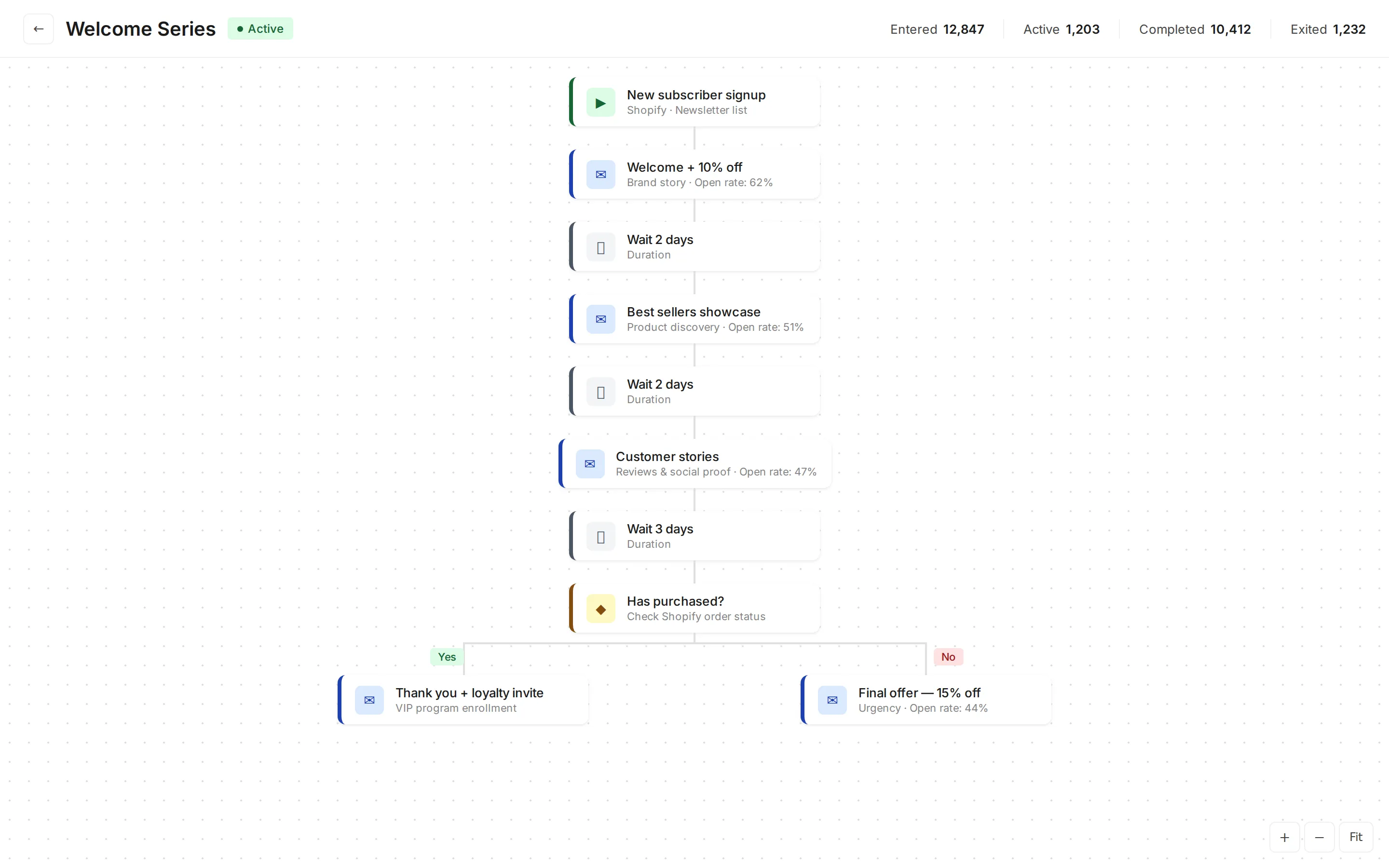
1. Welkomstserie
Trigger: aanmelding van nieuwe klant of abonnee Doel: je merk introduceren en de eerste (of tweede) aankoop stimuleren
Aanbevolen sequentie:
| Timing | Inhoud | Doel | |
|---|---|---|---|
| 1 | Direct | Merkverhaal, welkomstaanbieding | Eerste indruk |
| 2 | Dag 2 | Bestsellers, sociaal bewijs | Productontdekking |
| 3 | Dag 4 | Klantverhalen, reviews | Vertrouwen opbouwen |
| 4 | Dag 7 | Aanbiedingsherinnering (als geen aankoop) | Conversiedruk |
Verwachte resultaten: welkomstserie-e-mails genereren 4x hogere openratio’s en 5x hogere klikratio’s dan standaardcampagnes. Een welkomstkorting (10-15%) converteert 15-25% van nieuwe abonnees.
Voor sjablonen en strategieën, zie onze gids voor welkomstserie-e-mails.
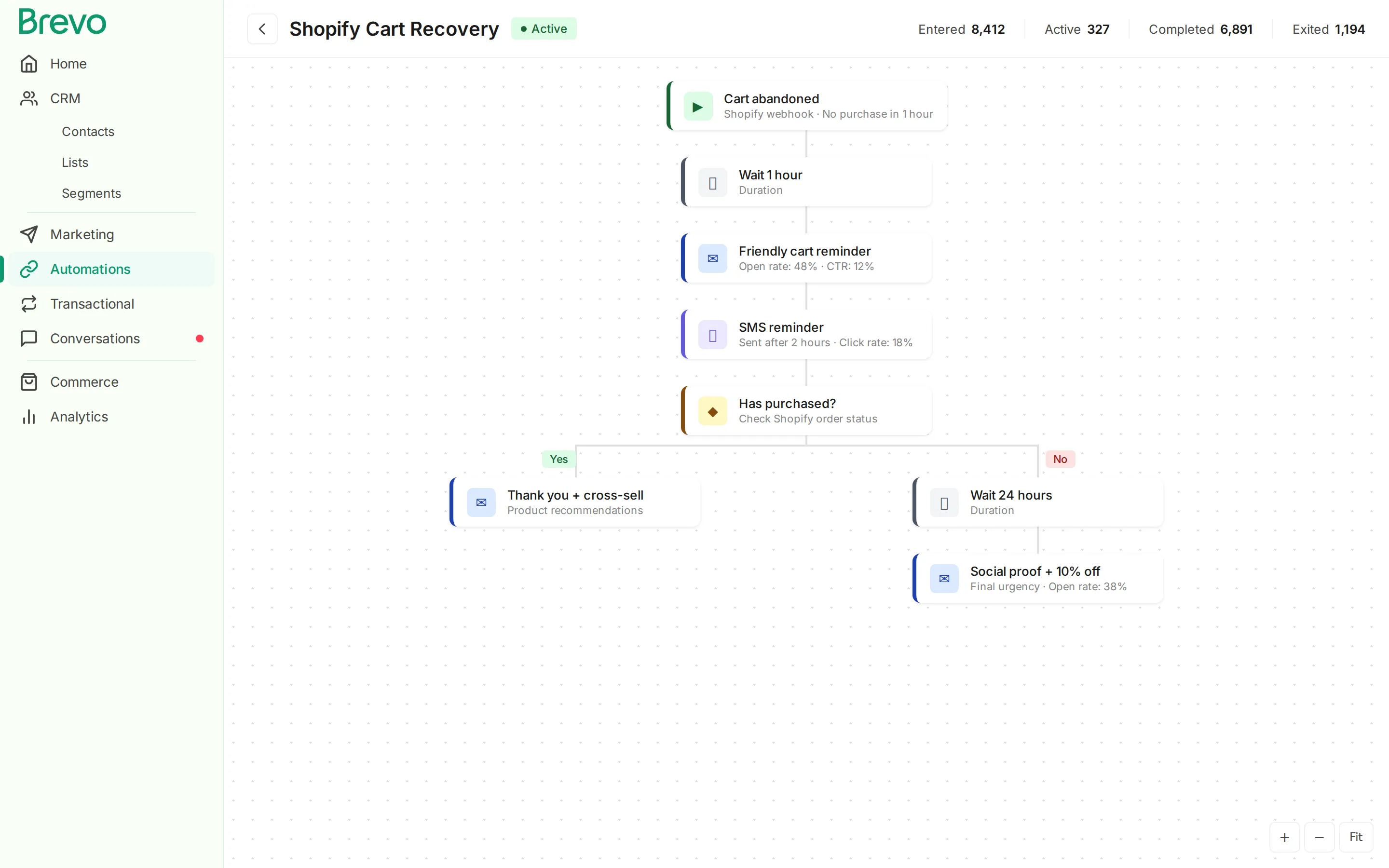
2. Herstel van verlaten winkelwagen
Trigger: winkelwagen aangemaakt maar geen aankoop binnen 1 uur Doel: verloren verkopen terugwinnen
Dit is doorgaans de automatisering met de hoogste ROI voor elke Shopify-winkel. Een driedelige e-mailsequentie met optionele sms-follow-ups herstelt 10-20% van verlaten winkelwagens.
Aanbevolen sequentie:
| Stap | Timing | Kanaal | Inhoud |
|---|---|---|---|
| 1 | 1 uur | Vriendelijke herinnering, winkelwageninhoud | |
| 2 | 2 uur | Sms | Korte herinnering met link |
| 3 | 24 uur | Sociaal bewijs, kleine aanbieding | |
| 4 | 48 uur | Laatste urgentie, sterkere aanbieding |
Voor gedetailleerde installatie-instructies, zie onze Shopify verlaten winkelwagen-e-mailgids.
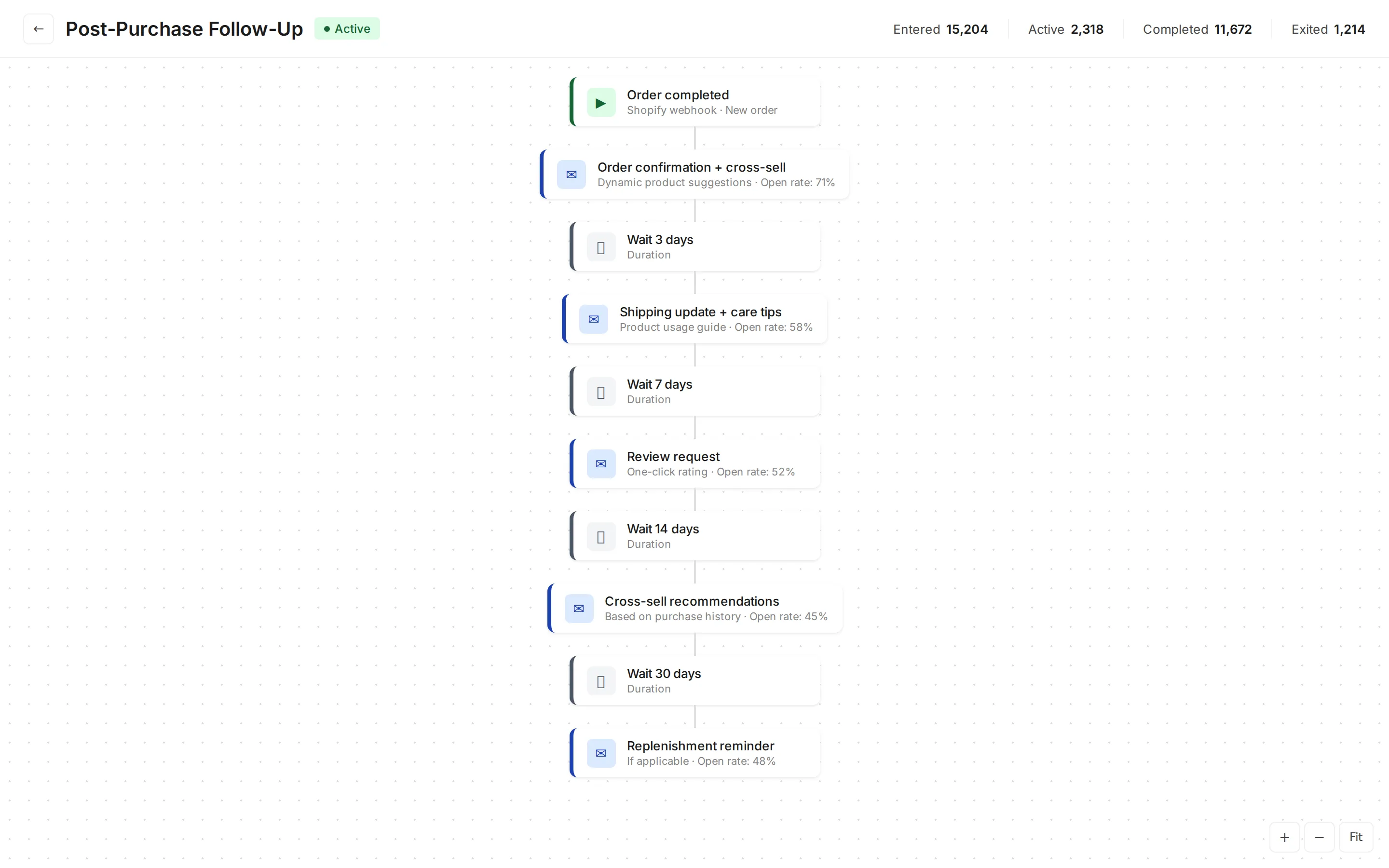
3. Post-aankoop follow-up
Trigger: bestelling voltooid Doel: reviews, cross-sells en herhaalaankopen stimuleren
| Timing | Inhoud | |
|---|---|---|
| 1 | Direct | Orderbevestiging met cross-sellaanbevelingen |
| 2 | Dag 3 | Verzendupdate met productverzorgingstips |
| 3 | Dag 7-10 | Verzoek om review |
| 4 | Dag 14 | Cross-sellaanbevelingen |
| 5 | Dag 30 | Aanvullingsherinnering (indien van toepassing) |
Met Tajo dat bestel- en productgegevens synchroniseert naar Brevo, worden cross-sellaanbevelingen automatisch gepersonaliseerd op basis van de daadwerkelijk gekochte artikelen.
Voor meer over post-aankoopstrategie, zie onze post-aankoop-e-mailgids.
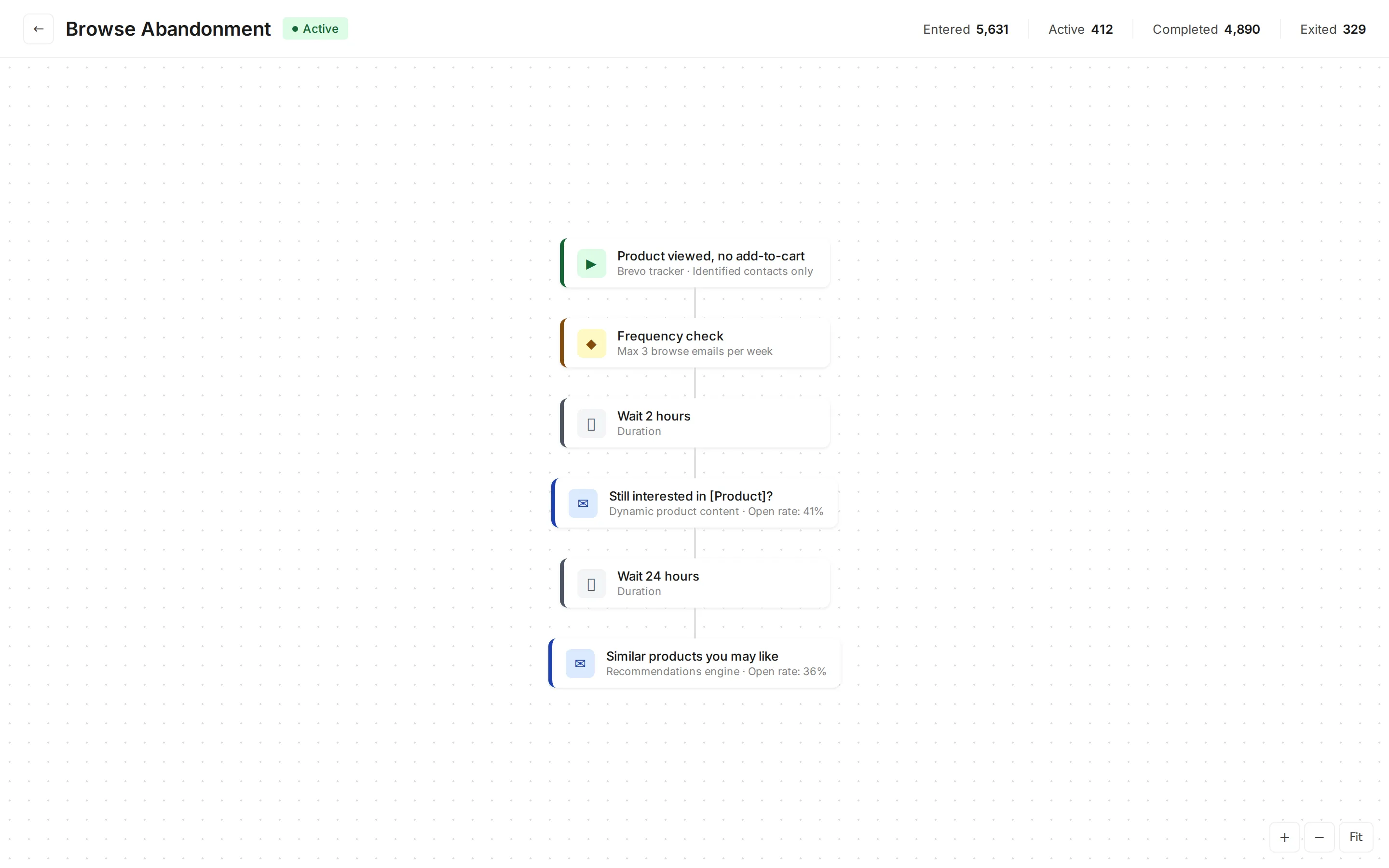
4. Surfgedragherinnering
Trigger: klant bekijkt producten maar voegt niets toe aan winkelwagen Doel: geïnteresseerde shoppers opnieuw betrekken
| Timing | Inhoud | |
|---|---|---|
| 1 | 2 uur | ”Nog steeds geïnteresseerd in [product]?” met productdetails |
| 2 | 24 uur | Vergelijkbare productaanbevelingen |
Best practice: activeer dit alleen voor geïdentificeerde contacten (ingelogde gebruikers of bekende e-mailabonnees). Stuur maximaal 2-3 surfgedragherinneringen per week om vermoeidheid te voorkomen.
5. Klantheractivering
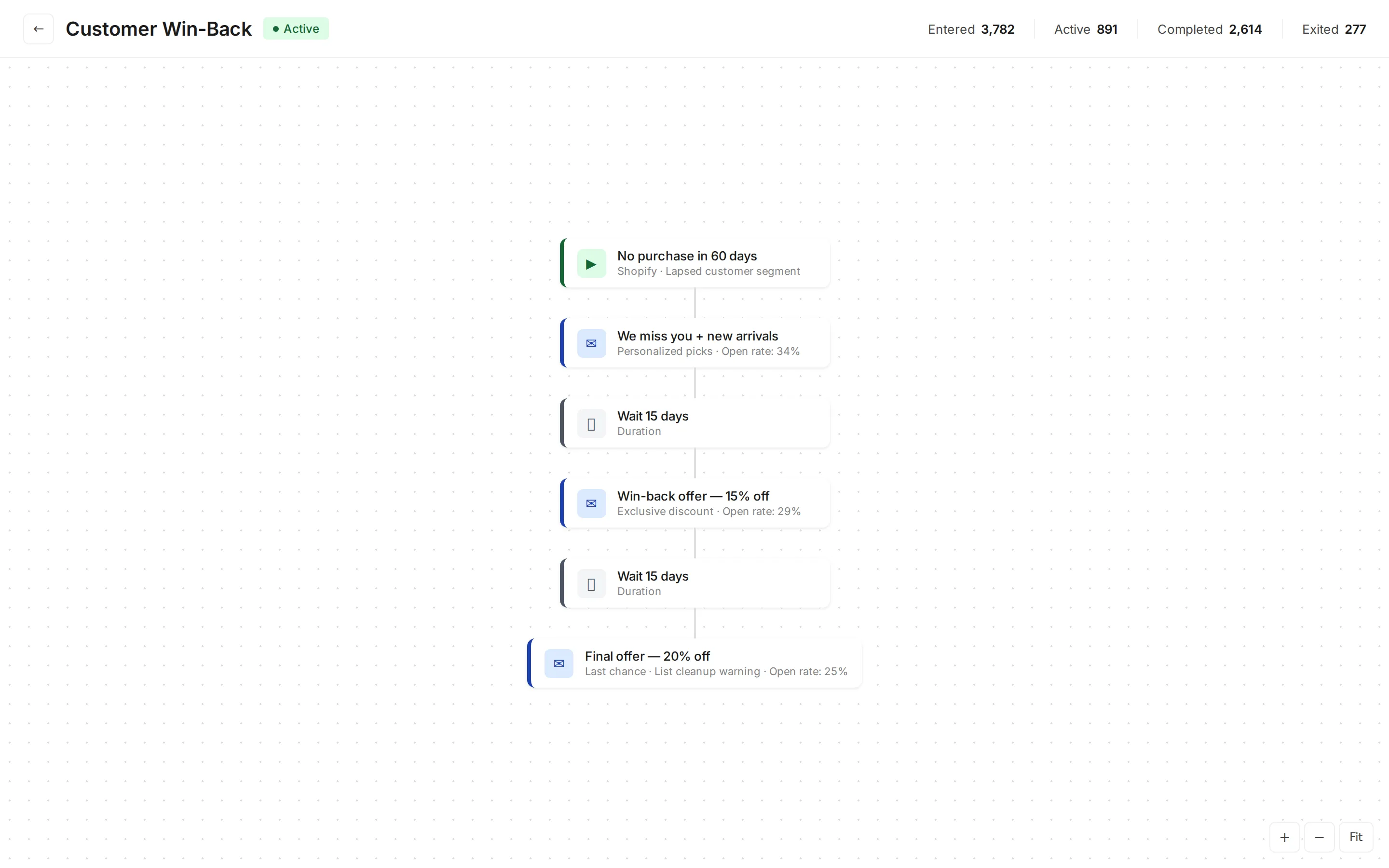
Trigger: geen aankoop in 60-90 dagen Doel: inactieve klanten opnieuw betrekken
| Timing | Inhoud | |
|---|---|---|
| 1 | Dag 60 | ”We missen je” met nieuwe aankomsten |
| 2 | Dag 75 | Heractivatieaanbieding (15-20% korting) |
| 3 | Dag 90 | Laatste aanbieding, melding van lijstopschoning |
Verwachte resultaten: heractivatiecampagnes herstellen 3-8% van inactieve klanten. De kosten voor het heractiveren van een bestaande klant zijn 5-7x lager dan het werven van een nieuwe.
Voor heractivatiestrategieën, zie onze gids voor heractivatie-e-mails.
6. VIP- en loyaliteitsprogramma’s
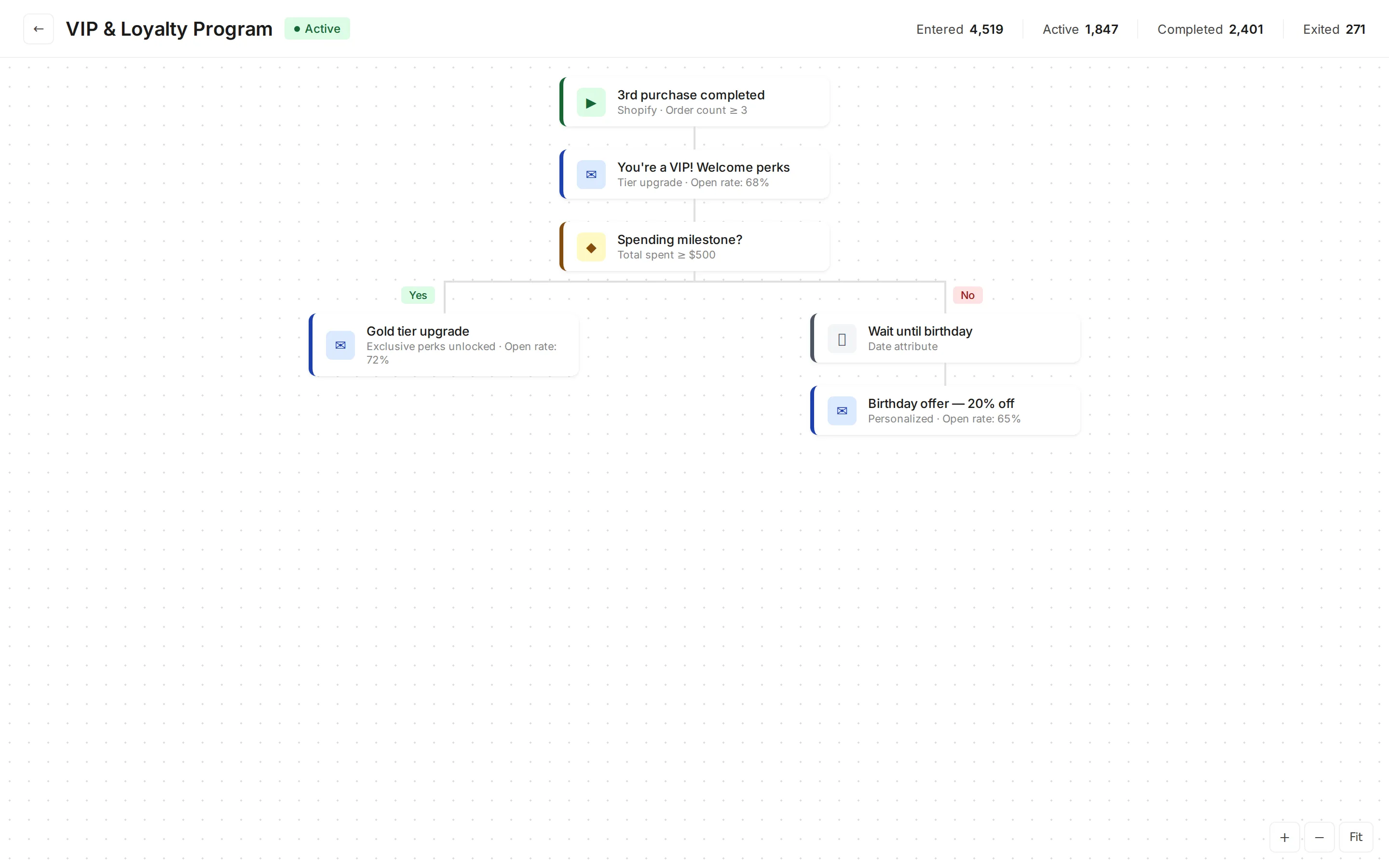
Trigger: klant bereikt bestedingsdrempel of aankoopijkpunt Doel: beste klanten belonen en behouden
| Trigger | Actie |
|---|---|
| 3e aankoop | ”Je bent een VIP”-welkomst met voordelen |
| Bestedingsijkpunt ($500) | Melding van tier-upgrade |
| Verjaardag | Gepersonaliseerd verjaardagsaanbod |
| Jubileum | Beloning voor eerste aankoopjubileum |
Tajo volgt de aankoopgeschiedenis van klanten en synchroniseert deze naar Brevo, waardoor het eenvoudig is om loyaliteitsautomatiseringen te activeren op basis van werkelijke bestedingsgegevens en aankoopfrequentie.
Voor loyaliteitsprogrammastrategieën, zie onze gids voor klantloyaliteitsprogramma’s.
7. Productaanvulling
Trigger: geschatte tijd sinds de laatste aankoop van een verbruiksproduct Doel: herhaalaankopen op het juiste moment stimuleren
| Producttype | Aanvullingstiming | Boodschap |
|---|---|---|
| Huidverzorging (30 dagen voorraad) | Dag 25 | ”Tijd om je [product] bij te vullen?” |
| Koffie (2 weken voorraad) | Dag 12 | ”Bijna op met [merk]?” |
| Diervoeding (maandelijks) | Dag 28 | ”[Diernaam] heeft bijna geen [product] meer” |
| Supplementen (60 dagen) | Dag 50 | ”Bestel je [product] opnieuw met 10% korting” |
8. Review- en UGC-verzameling
Trigger: levering bevestigd + wachttijd Doel: reviews, foto’s en door gebruikers gegenereerde content verzamelen
Best practice: stuur 5-7 dagen na levering voor fysieke producten. Maak het reviewproces zo eenvoudig mogelijk met een 1-klikbeoordeling in de e-mail die leidt naar een volledig reviewformulier.
Shopify marketing automation instellen met Brevo en Tajo
Stap 1: verbind je winkel
Installeer Tajo en verbind je Shopify-winkel met Brevo. De eerste synchronisatie importeert je bestaande klanten, bestellingen en productcatalogus, wat je de gegevensonderbouw voor alle automatiseringen geeft.
Stap 2: configureer gegevenstoewijzing
Zorg dat deze gegevenspunten correct worden gesynchroniseerd:
| Gegevenstype | Gebruik in automatisering |
|---|---|
| Klantprofielen | Personalisatie, segmentatie |
| Bestelgeschiedenis | Post-aankoopflows, aanvullingstiming |
| Productcatalogus | Dynamische productinhoud in e-mails |
| Winkelwagengebeurtenissen | Triggers voor verlaten winkelwagen |
| Surfgedraggebeurtenissen | Triggers voor surfgedragherinnering |
| Klanttags | Segmentgebaseerde automatiseringsrouting |
Stap 3: bouw kernautomatiseringen
Begin met de drie omzetgenererende automatiseringen:
- Herstel van verlaten winkelwagen (hoogste directe ROI)
- Welkomstserie (hoogste impact op lange termijn)
- Post-aankoop follow-up (stimuleert reviews en herhalingsverkopen)
Stap 4: ontwerp e-mailsjablonen
Maak herbruikbare sjablonen in Brevo’s drag-and-drop-editor voor elk automatiseringstype. Gebruik dynamische inhoudsblokken die productafbeeldingen, prijzen en details ophalen uit je gesynchroniseerde catalogus.
Stap 5: voeg sms-touchpoints toe
Voeg sms-berichten toe aan je hoogwaardige automatiseringen (carstherstel en tijdgevoelige promoties). De ingebouwde sms-mogelijkheden van Brevo betekenen dat je geen aparte sms-provider nodig hebt.
Stap 6: lanceer, monitor en optimaliseer
Activeer automatiseringen één voor één, monitor de prestaties 2-4 weken, optimaliseer daarna voordat je de volgende lanceert. Deze methodische aanpak voorkomt problemen en laat je leren van elke automatisering.
Prestatiebenchmarks voor automatisering
| Automatisering | Openratio | CTR | Conversieratio | Impact op omzet |
|---|---|---|---|---|
| Welkomstserie | 50-70% | 10-15% | 15-25% | Fundament |
| Carstherstel | 40-55% | 8-15% | 5-15% | Hoogste directe ROI |
| Na aankoop | 55-65% | 8-12% | 3-8% | Langetermijn-CLV |
| Surfgedragherinnering | 35-50% | 5-10% | 2-5% | Incrementeel |
| Heractivering | 25-40% | 3-8% | 3-8% | Reactivering |
| VIP/loyaliteit | 55-70% | 12-18% | 10-20% | Behoud |
| Aanvulling | 45-60% | 10-15% | 8-15% | Herhalingsomzet |
Veelgemaakte fouten
1. Alles tegelijk lanceren. Begin met 2-3 automatiseringen, optimaliseer ze, breid dan pas uit. Tien workflows tegelijk lanceren maakt het onmogelijk om problemen op te lossen.
2. Niet onderdrukken over automatiseringen heen. Een klant mag niet op dezelfde dag een cartherstellings-e-mail, een surfgedragherinnering én een promotionele campagne ontvangen. Stel frequentielimieten en onderdrukkingsregels in.
3. Generieke inhoud gebruiken. Dynamische productinhoud aangedreven door je gesynchroniseerde catalogusdata presteert altijd beter dan generieke berichten. Investeer de tijd om dynamische blokken in te stellen.
4. Sms negeren. Alleen e-mailherstel laat aanzienlijke omzet liggen. Sms toevoegen aan carstherstel alleen kan de herstelpercentages al met 30-50% verhogen.
5. Instellen en vergeten. Beoordeel automatiseringsprestaties maandelijks. Vernieuw creatieve inhoud per kwartaal. Klantgedrag en marktomstandigheden veranderen, en je automatiseringen moeten daarmee meeveranderen.
Aan de slag
Shopify marketing automation is geen project met een eindpunt. Het is een doorlopend systeem dat waardevoller wordt naarmate je automatiseringen toevoegt, triggers verfijnt en ontdekt wat aanslaat bij je klanten.
Begin met de drie kernautomatiseringen (welkomst, carstherstel, na aankoop), verbind je winkel met Brevo via Tajo voor de gegevensonderbouw, en bouw vandaaruit verder. Elke automatisering die je toevoegt vergroot de waarde, waardoor een marketingmotor ontstaat die dag en nacht omzet genereert.
Voor gerelateerde strategieën, bekijk onze gids voor e-mailmarketingautomatiseringsworkflows, Shopify CRM-gids en voorbeelden van marketingautomatisering.