
इस पेज पर
CRM ईमेल ऑटोमेशन उस खाई को पाटता है, जो अपने ग्राहकों को जानने और उनसे असरदार तरीक़े से बात करने के बीच होती है. जब आपका CRM डेटा सीधे आपकी ईमेल मार्केटिंग तक पहुँचता है, तो हर संदेश प्रासंगिक, समय पर और व्यक्तिगत बन जाता है, वह भी हर बार भेजने के लिए मैनुअल मेहनत के बिना.
फिर भी कई बिज़नेस आज भी अलग-थलग सिस्टम के साथ चलते हैं: ग्राहक डेटा एक टूल में रहता है, ईमेल कैम्पेन दूसरे में, और मार्केटिंग टीम घंटों लिस्ट एक्सपोर्ट करने तथा सेगमेंट बनाने में लगाती है. यह गाइड आपको दिखाती है कि अपने CRM को ईमेल मार्केटिंग से कैसे जोड़ें और ऐसे ऑटोमेशन वर्कफ़्लो कैसे बनाएँ जो मापने योग्य नतीजे दें.
CRM ईमेल ऑटोमेशन क्या है?
CRM ईमेल ऑटोमेशन का मतलब है कस्टमर रिलेशनशिप मैनेजमेंट डेटा का इस्तेमाल करके ईमेल कैम्पेन को अपने आप ट्रिगर करना, व्यक्तिगत बनाना और बेहतर करना. पूरी लिस्ट को एक ही संदेश भेजने के बजाय, CRM ईमेल ऑटोमेशन कॉन्टैक्ट प्रॉपर्टी, ख़रीद इतिहास, एंगेजमेंट स्कोर और व्यवहार आधारित ट्रिगर से लक्षित संदेश भेजता है.
CRM ईमेल ऑटोमेशन, बुनियादी ईमेल मार्केटिंग से कैसे अलग है
| फ़ीचर | बुनियादी ईमेल मार्केटिंग | CRM ईमेल ऑटोमेशन |
|---|---|---|
| डेटा स्रोत | सिर्फ़ ईमेल लिस्ट | पूरी ग्राहक प्रोफ़ाइल |
| सेगमेंटेशन | मैनुअल लिस्ट मैनेजमेंट | डायनामिक, डेटा आधारित सेगमेंट |
| ट्रिगर | तय समय पर भेजना | व्यवहार और डेटा आधारित ट्रिगर |
| पर्सनलाइज़ेशन | नाम और बुनियादी मर्ज टैग | CRM फ़ील्ड से गहरा पर्सनलाइज़ेशन |
| लीड स्कोरिंग | उपलब्ध नहीं | स्वचालित स्कोरिंग और रूटिंग |
| सेल्स के साथ तालमेल | सेल्स से अलग | सेल्स और मार्केटिंग का साझा दृश्य |
| रिपोर्टिंग | सिर्फ़ ईमेल मेट्रिक | पूरे फ़नल का एट्रिब्यूशन |
इंटीग्रेशन का बिज़नेस तर्क
जो कंपनियाँ अपने CRM को ईमेल मार्केटिंग से जोड़ती हैं, उन्हें प्रमुख मेट्रिक में बड़ा सुधार दिखता है:
- CRM डेटा से बनी व्यक्तिगत सब्जेक्ट लाइन से 26% ज़्यादा ओपन रेट
- जब ईमेल प्राप्तकर्ता के लाइफ़साइकल चरण से मेल खाते हैं, तब 41% ज़्यादा CTR
- बैच-एंड-ब्लास्ट ईमेल कैम्पेन की तुलना में 77% ज़्यादा ROI
- मैनुअल लिस्ट मैनेजमेंट में लगने वाले समय में 50% की कमी
ये आँकड़े एक सीधी सच्चाई दिखाते हैं: जब आप अपने ग्राहक को जानते हैं, तब आपके ईमेल बेहतर प्रदर्शन करते हैं.
ईमेल ऑटोमेशन के लिए ज़रूरी CRM डेटा बिंदु
वर्कफ़्लो बनाने से पहले पहचानें कि कौन-से CRM डेटा बिंदु आपके ईमेल पर्सनलाइज़ेशन को चलाएँगे. सबसे असरदार डेटा चार श्रेणियों में आता है.
कॉन्टैक्ट प्रॉपर्टी
बुनियादी जनसांख्यिकीय और कंपनी संबंधी डेटा पर्सनलाइज़ेशन की नींव बनाता है:
- नाम, कंपनी, पद और उद्योग
- स्थान और टाइमज़ोन (भेजने के समय को बेहतर बनाने के लिए)
- अधिग्रहण का स्रोत और तारीख़
- अकाउंट का प्रकार और ग्राहक टियर
- पसंदीदा संवाद चैनल
व्यवहार डेटा
आपके कॉन्टैक्ट जो कार्रवाइयाँ करते हैं, वे उनकी मंशा और रुचि बताती हैं:
- देखे गए वेबसाइट पेज और डाउनलोड किया गया कंटेंट
- देखे गए प्रोडक्ट पेज और खंगाले गए फ़ीचर
- भेजे और हल किए गए सपोर्ट टिकट
- इवेंट रजिस्ट्रेशन और वेबिनार में उपस्थिति
- पिछला ईमेल एंगेजमेंट (ओपन, क्लिक, जवाब)
लेनदेन डेटा
ख़रीद और राजस्व डेटा कॉमर्स आधारित ऑटोमेशन संभव बनाता है:
- ऑर्डर इतिहास और ख़रीद की फ़्रीक्वेंसी
- औसत ऑर्डर मूल्य और लाइफ़टाइम वैल्यू
- ख़रीदी गई प्रोडक्ट कैटेगरी
- कार्ट छोड़ने के इवेंट
- सब्सक्रिप्शन की स्थिति और नवीनीकरण की तारीख़ें
एंगेजमेंट स्कोरिंग
मिश्रित स्कोर कॉन्टैक्ट को प्राथमिकता देने और सही जगह भेजने में मदद करते हैं:
- फ़िट और व्यवहार पर आधारित लीड स्कोर
- हाल की गतिविधि पर नज़र रखने वाला एंगेजमेंट स्कोर
- मौजूदा ग्राहकों के लिए हेल्थ स्कोर
- चर्न जोखिम के संकेतक
Brevo जैसे प्लेटफ़ॉर्म, जिनमें CRM और ईमेल जुड़े हुए हैं, यह डेटा नेटिव रूप से उपलब्ध कराते हैं.
CRM ईमेल ऑटोमेशन वर्कफ़्लो बनाना
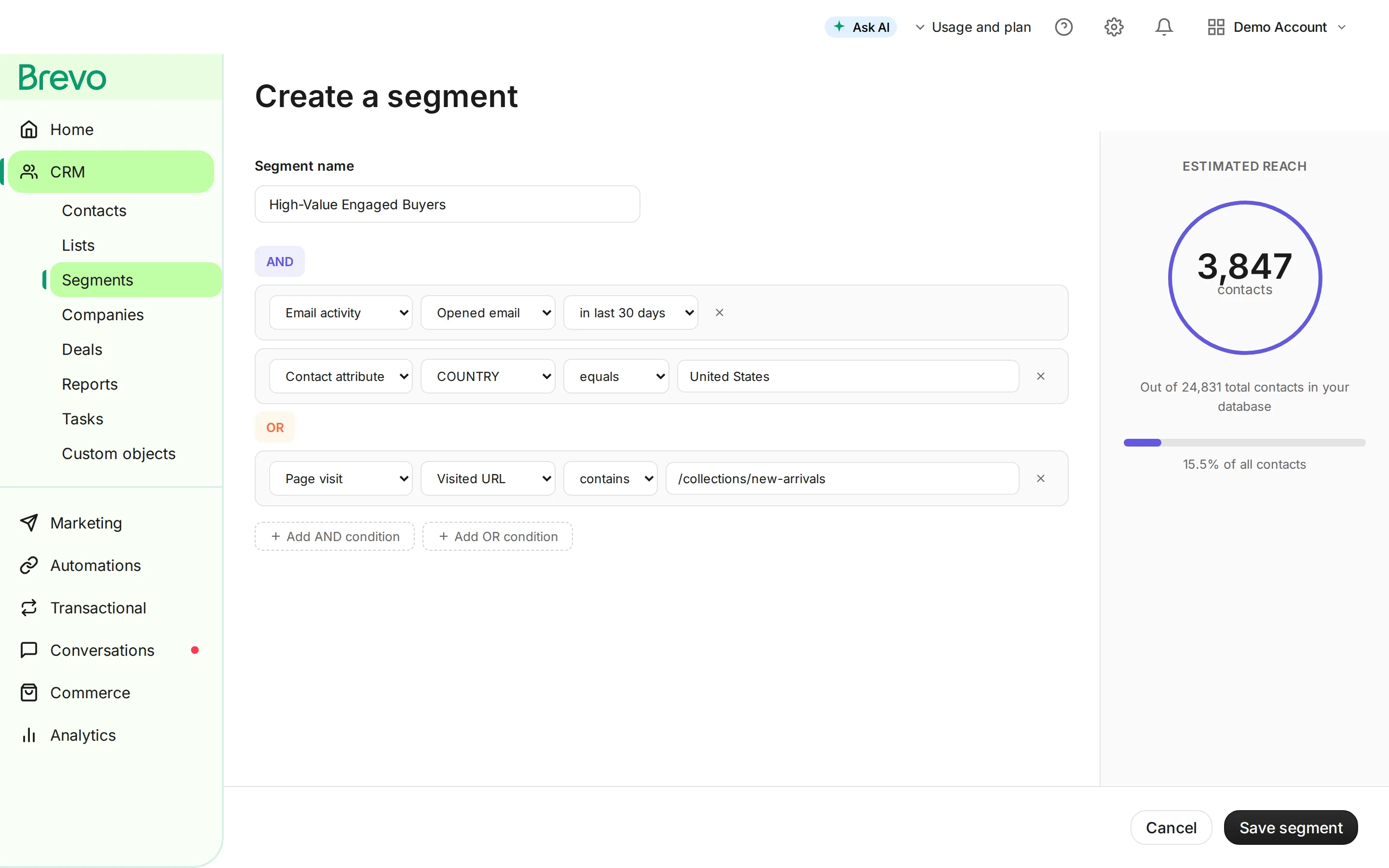
जब आपके CRM और ईमेल प्लेटफ़ॉर्म के बीच डेटा बहने लगता है, तब आप ऐसे वर्कफ़्लो बना सकते हैं जो असली ग्राहक कार्रवाइयों और पड़ावों पर प्रतिक्रिया देते हैं.
1. लीड नर्चरिंग सीक्वेंस
जब कोई नई लीड आपके CRM में आती है, तब एक स्वचालित नर्चर सीक्वेंस उसे ख़रीद के फ़ैसले की ओर तैयार करता है.
ट्रिगर: लीड स्थिति के साथ नया कॉन्टैक्ट बनना वर्कफ़्लो:
- तुरंत: वैल्यू प्रपोज़िशन के साथ वेलकम ईमेल
- दिन 2: उनकी रुचि के क्षेत्र से मेल खाता शैक्षिक कंटेंट
- दिन 5: उनके उद्योग से जुड़ी केस स्टडी या सामाजिक प्रमाण
- दिन 8: प्रोडक्ट तुलना या फ़ीचर की गहराई से जानकारी
- दिन 12: कंसल्टेशन की पेशकश या मुफ़्त ट्रायल का निमंत्रण
CRM इंटीग्रेशन बिंदु:
- हर ईमेल इंटरैक्शन के बाद लीड स्कोर अपडेट करें
- स्कोर तय सीमा तक पहुँचने पर सेल्स को भेजें
- अगर कॉन्टैक्ट सीधे सेल्स से जुड़ जाए, तो सीक्वेंस रोक दें
2. ग्राहक ऑनबोर्डिंग ऑटोमेशन
ख़रीद के बाद के ऑनबोर्डिंग ईमेल चर्न घटाते हैं और मूल्य तक पहुँचने का समय कम करते हैं.
ट्रिगर: CRM में डील का “Closed Won” के रूप में चिह्नित होना वर्कफ़्लो:
- तुरंत: स्वागत और अकाउंट सेटअप के निर्देश
- दिन 1: उनके ख़ास प्रोडक्ट के लिए क्विक-स्टार्ट गाइड
- दिन 3: सबसे ज़्यादा मूल्य पाने के सुझाव
- दिन 7: सपोर्ट संसाधनों के साथ हालचाल पूछना
- दिन 14: उपयोग डेटा के आधार पर किसी फ़ीचर पर ज़ोर
- दिन 30: संतुष्टि सर्वे और रिव्यू का अनुरोध
3. री-एंगेजमेंट कैम्पेन
CRM गतिविधि डेटा से निष्क्रिय कॉन्टैक्ट पहचानें और उन्हें वापस लाएँ.
ट्रिगर: 60 दिनों में कोई ईमेल ओपन नहीं और 30 दिनों में कोई CRM गतिविधि नहीं वर्कफ़्लो:
- सब्जेक्ट लाइन: व्यक्तिगत ऑफ़र के साथ “हमें आपकी कमी खल रही है”
- दिन 5: उनकी पिछली ख़रीद से जुड़ी नई प्रोडक्ट ख़बरें
- दिन 10: लौटने के लिए ख़ास प्रोत्साहन
- दिन 15: फ़ीडबैक अनुरोध के साथ आख़िरी कोशिश
- अगर कोई एंगेजमेंट न हो: CRM में सप्रेशन लिस्ट में डालें
4. अपसेल और क्रॉस-सेल ऑटोमेशन
पूरक प्रोडक्ट सुझाने के लिए अपने CRM के ख़रीद इतिहास का इस्तेमाल करें.
ट्रिगर: किसी ख़ास प्रोडक्ट कैटेगरी का ऑर्डर पूरा होना वर्कफ़्लो:
- ख़रीद के 3 दिन बाद: उपयोग के सुझावों के साथ धन्यवाद
- दिन 14: पूरक प्रोडक्ट की सिफ़ारिश
- दिन 30: उपयोग पैटर्न के आधार पर अपग्रेड का मौक़ा
- दिन 60: लॉयल्टी रिवॉर्ड या ख़ास अर्ली ऐक्सेस
ईमेल ऑटोमेशन वाला CRM कैसे चुनें
हर CRM ईमेल ऑटोमेशन को एक जैसा नहीं संभालता. जुड़ी हुई ईमेल मार्केटिंग के लिहाज़ से बड़े प्लेटफ़ॉर्म की तुलना इस तरह है.
| प्लेटफ़ॉर्म | नेटिव ईमेल | ऑटोमेशन की गहराई | मुफ़्त टियर | किसके लिए सबसे अच्छा |
|---|---|---|---|---|
| Brevo | पूरा ईमेल मार्केटिंग सूट | उन्नत वर्कफ़्लो | 300 ईमेल/दिन, असीमित कॉन्टैक्ट | ऑल-इन-वन चाहने वाले SMB |
| HubSpot | बिल्ट-इन ईमेल टूल | व्यापक | 2,000 ईमेल/माह तक सीमित | बढ़ती हुई कंपनियाँ |
| ActiveCampaign | उन्नत ईमेल बिल्डर | उद्योग में अग्रणी | कोई मुफ़्त टियर नहीं | ऑटोमेशन केंद्रित टीमें |
| Salesforce | Marketing Cloud के ज़रिए | एंटरप्राइज़ स्तर | कोई मुफ़्त टियर नहीं | एंटरप्राइज़ संगठन |
| Zoho CRM | Zoho Campaigns के ज़रिए | मध्यम | 6,000 ईमेल/माह | बजट के प्रति सजग टीमें |
विकल्प परख रहे बिज़नेस के लिए, CRM सॉफ़्टवेयर और मार्केटिंग ऑटोमेशन प्लेटफ़ॉर्म पर हमारी गाइड ज़्यादा गहरी तुलना देती हैं.
जुड़े हुए समाधान में क्या देखें
डेटा सिंक्रोनाइज़ेशन: CRM में कॉन्टैक्ट अपडेट तुरंत ईमेल सेगमेंट में दिखने चाहिए. रियल-टाइम सिंक पुराने संदेश भेजने से रोकता है.
वर्कफ़्लो बिल्डर: ब्रांचिंग लॉजिक, प्रतीक्षा चरण और कंडीशनल कार्रवाइयों वाले विज़ुअल वर्कफ़्लो एडिटर जटिल ऑटोमेशन को बिना कोडिंग के सुलभ बनाते हैं.
सेगमेंटेशन इंजन: ऐसे डायनामिक सेगमेंट जो सिर्फ़ ईमेल व्यवहार से नहीं, बल्कि CRM फ़ील्ड बदलने पर अपने आप अपडेट हों.
एट्रिब्यूशन रिपोर्टिंग: सिर्फ़ ओपन और क्लिक नहीं, बल्कि यह ट्रैक करें कि किन ईमेल ने पाइपलाइन और राजस्व को आगे बढ़ाया.
API ऐक्सेस: नेटिव इंटीग्रेशन होने पर भी, API ऐक्सेस आपके व्यापक टेक स्टैक के साथ कस्टम कनेक्शन बनाने देता है.
लागू करने के सर्वोत्तम तरीक़े
अपने सबसे असरदार वर्कफ़्लो से शुरुआत करें
एक साथ सब कुछ स्वचालित करने की कोशिश न करें. उस वर्कफ़्लो को पहचानें जिसमें सबसे ज़्यादा राजस्व की संभावना या समय की बचत है, और पहले उसी को बनाएँ. ज़्यादातर बिज़नेस के लिए यह या तो लीड नर्चरिंग होती है या छोड़े गए कार्ट की रिकवरी.
पहले अपना CRM डेटा साफ़ करें
ऑटोमेशन अच्छे और ख़राब, दोनों तरह के डेटा का असर बढ़ा देता है. वर्कफ़्लो शुरू करने से पहले:
- कॉन्टैक्ट रिकॉर्ड से डुप्लिकेट हटाएँ
- फ़ील्ड फ़ॉर्मैट मानकीकृत करें (तारीख़, फ़ोन नंबर, पते)
- ग़ायब अहम फ़ील्ड भरें
- किसी वैलिडेशन सेवा से ईमेल पते सत्यापित करें
- सचमुच निष्क्रिय कॉन्टैक्ट आर्काइव करें
अपनी ग्राहक यात्रा मैप करें
यह दर्ज करें कि आपके CRM में ग्राहक किन चरणों से गुज़रता है और हर चरण पर कौन-से ईमेल टचपॉइंट हैं.
| CRM चरण | ईमेल ऑटोमेशन | लक्ष्य |
|---|---|---|
| नई लीड | वेलकम सीक्वेंस | शिक्षित और क्वालिफ़ाई करना |
| मार्केटिंग क्वालिफ़ाइड | नर्चर सीक्वेंस | भरोसा और मंशा बनाना |
| सेल्स क्वालिफ़ाइड | सेल्स सहायक ईमेल | डील बंद करने में मदद |
| नया ग्राहक | ऑनबोर्डिंग सीक्वेंस | मूल्य तक पहुँचने का समय घटाना |
| सक्रिय ग्राहक | एंगेजमेंट कैम्पेन | अपसेल और रिटेंशन |
| जोखिम में | री-एंगेजमेंट सीक्वेंस | चर्न रोकना |
| छूटा हुआ | विन-बैक कैम्पेन | दोबारा सक्रिय करना |
सही ट्रैकिंग सेट अप करें
पक्का करें कि आपका CRM ईमेल एंगेजमेंट डेटा वापस कॉन्टैक्ट रिकॉर्ड में दर्ज करे:
- ईमेल ओपन और क्लिक कॉन्टैक्ट की गतिविधि टाइमलाइन अपडेट करें
- लिंक क्लिक CRM ऑटोमेशन ट्रिगर करें (टास्क बनाना, चरण बदलना)
- जवाब असाइन किए गए सेल्स प्रतिनिधि तक पहुँचें
- अनसब्सक्राइब CRM की संवाद प्राथमिकताएँ अपडेट करें
स्केल करने से पहले टेस्ट करें
अपना पूरा डेटाबेस जोड़ने से पहले:
- पहले किसी छोटे आंतरिक समूह के साथ टेस्ट करें
- जाँचें कि सिस्टम के बीच डेटा सही ढंग से बह रहा है
- देखें कि पर्सनलाइज़ेशन टोकन ठीक से भर रहे हैं
- पुष्टि करें कि सप्रेशन नियम काम कर रहे हैं (अनसब्सक्राइब कॉन्टैक्ट को ईमेल न जाए)
- शुरुआती भेजने के दौरान डिलीवरेबिलिटी मेट्रिक पर नज़र रखें
CRM ईमेल ऑटोमेशन की आम ग़लतियाँ
ज़रूरत से ज़्यादा ऑटोमेशन: हर इंटरैक्शन के लिए स्वचालित ईमेल ज़रूरी नहीं है. ऑटोमेशन को दोहराए जाने वाले, उच्च-मूल्य टचपॉइंट के लिए रखें और असली मानवीय संवाद की गुंजाइश छोड़ें.
डेटा हाइजीन की अनदेखी: गंदे डेटा पर बना ऑटोमेशन ग़लत लोगों को ग़लत संदेश भेजता है. नियमित लिस्ट सफ़ाई और CRM ऑडिट तय करें.
सिर्फ़ एक चैनल की सोच: CRM डेटा को मल्टी-चैनल संवाद चलाना चाहिए. ज़्यादा एंगेजमेंट के लिए ईमेल को SMS ऑटोमेशन और WhatsApp मार्केटिंग के साथ जोड़ें.
बाहर निकलने की शर्तें न होना: हर वर्कफ़्लो में बाहर निकलने की स्पष्ट शर्तें चाहिए. अगर कोई लीड नर्चर के बीच में ही ग्राहक बन जाए, तो उसे नर्चर सीक्वेंस से बाहर निकलकर ऑनबोर्डिंग में जाना चाहिए, न कि दोनों एक साथ मिलने चाहिए.
सेट करके भूल जाने की सोच: वर्कफ़्लो का प्रदर्शन हर महीने देखें. सब्जेक्ट लाइन बेहतर करें, समय समायोजित करें, कंटेंट अपडेट करें और नतीजों के आधार पर सेगमेंट परिष्कृत करें.
CRM ईमेल ऑटोमेशन की सफलता कैसे मापें
अपने ऑटोमेशन के प्रदर्शन का आकलन करने के लिए ये मेट्रिक ट्रैक करें:
| मेट्रिक | यह क्या मापता है | लक्ष्य |
|---|---|---|
| वर्कफ़्लो पूरा होने की दर | सीक्वेंस पूरा करने वालों का प्रतिशत | 60-80% |
| चरण कन्वर्शन दर | CRM चरण में आगे बढ़ने वाले कॉन्टैक्ट | 15-25% |
| प्रभावित राजस्व | ऑटोमेशन से आई पाइपलाइन और राजस्व | हर तिमाही बढ़ता हुआ |
| बचा हुआ समय | मैनुअल प्रक्रियाओं से बचे घंटे | हर महीने ट्रैक करें |
| कॉन्टैक्ट गुणवत्ता स्कोर | औसत लीड स्कोर में सुधार | समय के साथ बेहतर होता हुआ |
| अनसब्सक्राइब दर | प्रति वर्कफ़्लो अनसब्सक्राइब | 0.5% से कम |
CRM ईमेल ऑटोमेशन की शुरुआत कैसे करें
अगर आप CRM ईमेल ऑटोमेशन में नए हैं, तो यह व्यावहारिक रोडमैप अपनाएँ:
- अपने मौजूदा सेटअप का ऑडिट करें: दर्ज करें कि ग्राहक डेटा कहाँ रहता है और अभी ईमेल कैसे भेजे जाते हैं
- जुड़ा हुआ प्लेटफ़ॉर्म चुनें: नेटिव ईमेल क्षमताओं वाला CRM चुनें, या अपने मौजूदा टूल जोड़ें
- डेटा साफ़ और व्यवस्थित करें: CRM फ़ील्ड मानकीकृत करें और ईमेल पते सत्यापित करें
- अपना पहला वर्कफ़्लो बनाएँ: वेलकम या नर्चर सीक्वेंस से शुरुआत करें
- अच्छी तरह टेस्ट करें: डेटा प्रवाह, पर्सनलाइज़ेशन और सप्रेशन नियम जाँचें
- लॉन्च करें और निगरानी रखें: छोटे सेगमेंट से शुरू करें और भरोसा बढ़ने पर विस्तार करें
- दोहराएँ और बेहतर करें: हर महीने प्रदर्शन देखें और लगातार सुधार करें
Brevo जैसे प्लेटफ़ॉर्म एक ही इंटरफ़ेस में नेटिव CRM और ईमेल मार्केटिंग देते हैं, जिससे इंटीग्रेशन की जटिलता ख़त्म हो जाती है.
CRM ईमेल ऑटोमेशन इस्तेमाल करने वाली कंपनियों और न करने वाली कंपनियों के बीच की खाई आगे और चौड़ी ही होगी. एक वर्कफ़्लो से शुरू करें, उसका मूल्य साबित करें, और वहीं से आगे बढ़ें.
Tajo कहाँ फिट होता है
Tajo एक इंटीग्रेशन बिल्डर है। इंटीग्रेशन बनाइए। उन पर एजेंट लगाइए। उन्हें एंगेजमेंट चलाने दीजिए। Tajo अभी अर्ली एक्सेस में है। अर्ली एक्सेस माँगें
अक्सर पूछे जाने वाले प्रश्न
CRM ईमेल ऑटोमेशन क्या है?
CRM ईमेल ऑटोमेशन आपके CRM में सहेजे गए ग्राहक डेटा का इस्तेमाल करके व्यक्तिगत ईमेल कैम्पेन अपने आप ट्रिगर करता है. यह कॉन्टैक्ट रिकॉर्ड, ख़रीद इतिहास और व्यवहार डेटा को जोड़कर सही संदेश सही समय पर भेजता है, बिना मैनुअल मेहनत के.
CRM ईमेल ऑटोमेशन के क्या फ़ायदे हैं?
CRM ईमेल ऑटोमेशन ओपन रेट 26% तक बढ़ाता है, पर्सनलाइज़ेशन के ज़रिए कन्वर्शन दर सुधारता है, मैनुअल काम घटाता है, लीड को छूटने से बचाता है और बड़े पैमाने पर लाइफ़साइकल मार्केटिंग संभव बनाता है.